


jQuery: Remove empty GET variables from URL
This little JQuery snippit can tidy up those GET method form posts by disabling empty inputs on Submit:
<script>
  (function($) {
    $('form').submit(function() { // ## Clean GET Variables
      $('form input').each(function() {
        if ($(this).val().length == 0) { // ## If Empty
          $(this).attr('disabled', true); // ## Disable Input
        }
      });
    });
  })(jQuery);
</script>
Simple, Minimal Table Style
For those who’ve need of a fairly simple, bare-bones, semi-transparent, monochromatic, print-friendly table style with minimal html markup and just enough sprinkled in to be respectable.
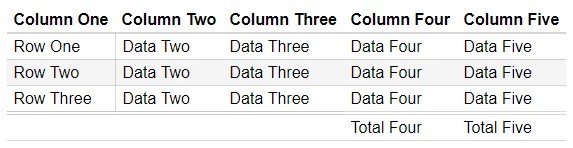

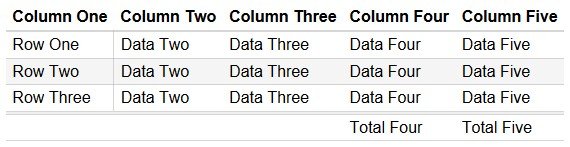
The CSS:
table {
 font: 1em/1.6em sans-serif;
 border-collapse: collapse;
 border-spacing: 0;
}
th, td {
 padding: 0 .4em;
 text-align: left;
 border-bottom: rgba(187,187,187,0.6) solid 1px;
}
thead th, thead td { border-bottom: rgba(187,187,187,0.6) solid 2px; }
tfoot th, tfoot td { border-top: rgba(187,187,187,0.6) double 4px; }
tbody th {
 font-weight: normal;
 border-right: rgba(187,187,187,0.6) solid 1px;
}
table a { text-decoration: none; }
tr:nth-child(even) { background: rgba(187,187,187,0.15) none; }
The HTML:
<table>
<thead>
 <tr>
 <th>Column One</th>
 <th>Column Two</th>
 <th>Column Three</th>
 <th>Column Four</th>
 <th>Column Five</th>
 </tr>
</thead>
<tbody>
 <tr>
 <th>Row One</th>
 <td>Data Two</td>
 <td>Data Three</td>
 <td>Data Four</td>
 <td>Data Five</td>
 </tr>
 <tr>
 <th>Row Two</th>
 <td>Data Two</td>
 <td>Data Three</td>
 <td>Data Four</td>
 <td>Data Five</td>
 </tr>
 <tr>
 <th>Row Three</th>
 <td>Data Two</td>
 <td>Data Three</td>
 <td>Data Four</td>
 <td>Data Five</td>
 </tr>
</tbody>
<tfoot>
    <tr>
        <td colspan="3"></td>
        <td>Total Four</td>
        <td>Total Five</td>
    </tr>
</tfoot>
</table>
Unicode 5d6 Roller via PHP/JS
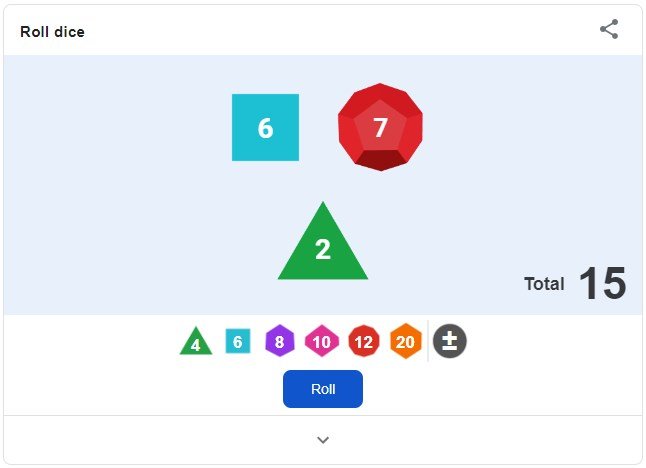
Update 09/2019: For the slightly less nerdy or those who just want something a whole lot fancier with less effort required, Google has now integrated animated d4, d6, d8, d10, d12 & d20 dice rolling into their search.
For myself and others with a disproportionate amount of nerdy, a (hopefully) lightweight digital replacement for those bereft of dice. Using convenient (if not cross compatible) HTML references for UTF-8/Unicode Symbols and some simple PHP or JavaScript we can roll a randomized set of five six-sided die with each browser refresh.
The HTML
First we build a HTML container for our die rolling script. While the CSS style adds unnecessary weight, it does allow for greater readability:
<html>
<head>
	<meta charset="utf-8">
</head>
<body>
	<h1 style="font: 42pt/.8em sans-serif;"><!-- Insert PHP or Javascript Here --></h1>
</body>
</html>
via PHP
A quick for loop and some (uncouth) shorthand allow us to push out five randomized UTF-8 symbols ranging between one and six. Should we desire more or less die in our roll, we simply adjust the loop accordingly:
<?php for ($x=0;$x<=4;$x++){ ?>ɨ<?= rand(0,5); ?><?php } ?>via Javascript
Once again, a simple loop and random zero to five append in shorthand. This time via the JavaScript fuctions document.write(), math.floor(), and math.random():
<script language="javascript">
for ($x=0;$x<=4;$x++){
document.write('ɨ' + (Math.random() * 5 | 0));
}
</script>Once we’ve pasted our script of choice, into our container we can minify the lot and upload someplace for all our tabletop gaming or dice rolling needs.
 © 2026 Aeroplankton Enthusiasts Society, All rights reserved.